
| Change Color Palette |  |
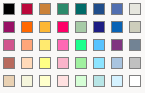
This tool will allow you to change Excel's color palette, making it possible for you to have fresh colors with a more professional and personalized tone. Naturally, this is added value for your spreadsheets.
Observation :
If you are making some work on workbooks which comprise the theme about colors of Excel 2007, simply click on the button " Theme colors" .
| Excel Default | Excel Model Builder Palette |
 |
 |
The following chart has been created using the Stock Quotes Palette:

Note:
If you need to have more Color Palettes, then you need to have the Color palette for Excel tool, as well as the Spreadsheet Presenter tool.
The images you see in the above chart have been added with the Chart Tools for Excel tool.