 |
| |
| Translate formulas to labels |
|
|
|
| |
This tool makes it possible to view formulas, but based on the row and column headings we have placed in our model
or work range.
An example will provide a better explanation of the tool's function.
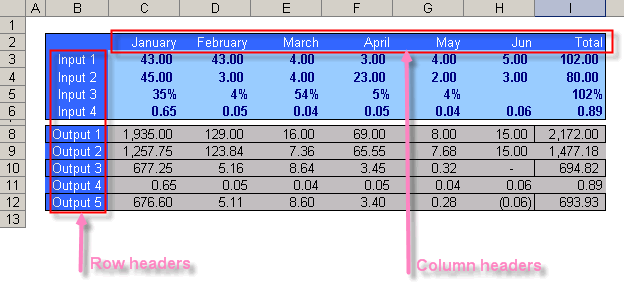
We have the following tables, with column headings (January, February, March,…) and row headings (Input 1, Input 2, …, Output 1, Output 2, …). |
| |
 |
| |
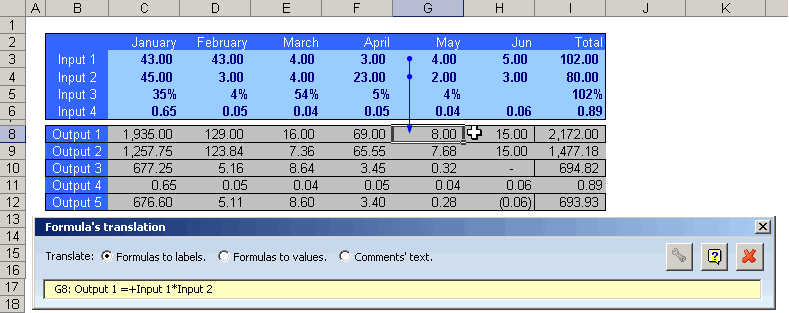
| We click on the Formulas to Labels option of the dialog box and then we move through our worksheet's cells. |
| |
 |
| |
| Notice how the formula's cells have been translated to their corresponding row and column headings. |
| |
 |
| |
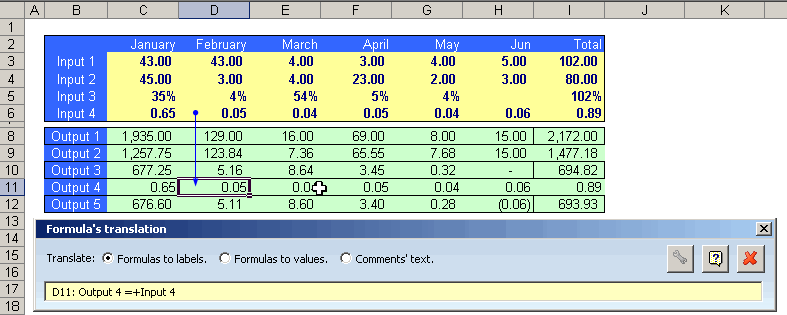
| Have another look, |
| |
 |
| |
Plus, as you may have already noticed, the tool shows the origin of the cells comprising the formula contained in the active cell.
Interesting, right?, use it! |
| |